 SnapFlow
Trust Center & Compliance
SnapFlow's public security posture at /trust, and the founder-only live verification dashboard that proves it.
Two different pages, two different audiences
SnapFlow has two security/compliance screens that are easy to mix up: the Trust Center (/trust) is public and read-only — anyone can see it, no login needed. Compliance (/admin/compliance) is a private, founder-only dashboard with live verification tools. This page covers both.
Trust Center (public)
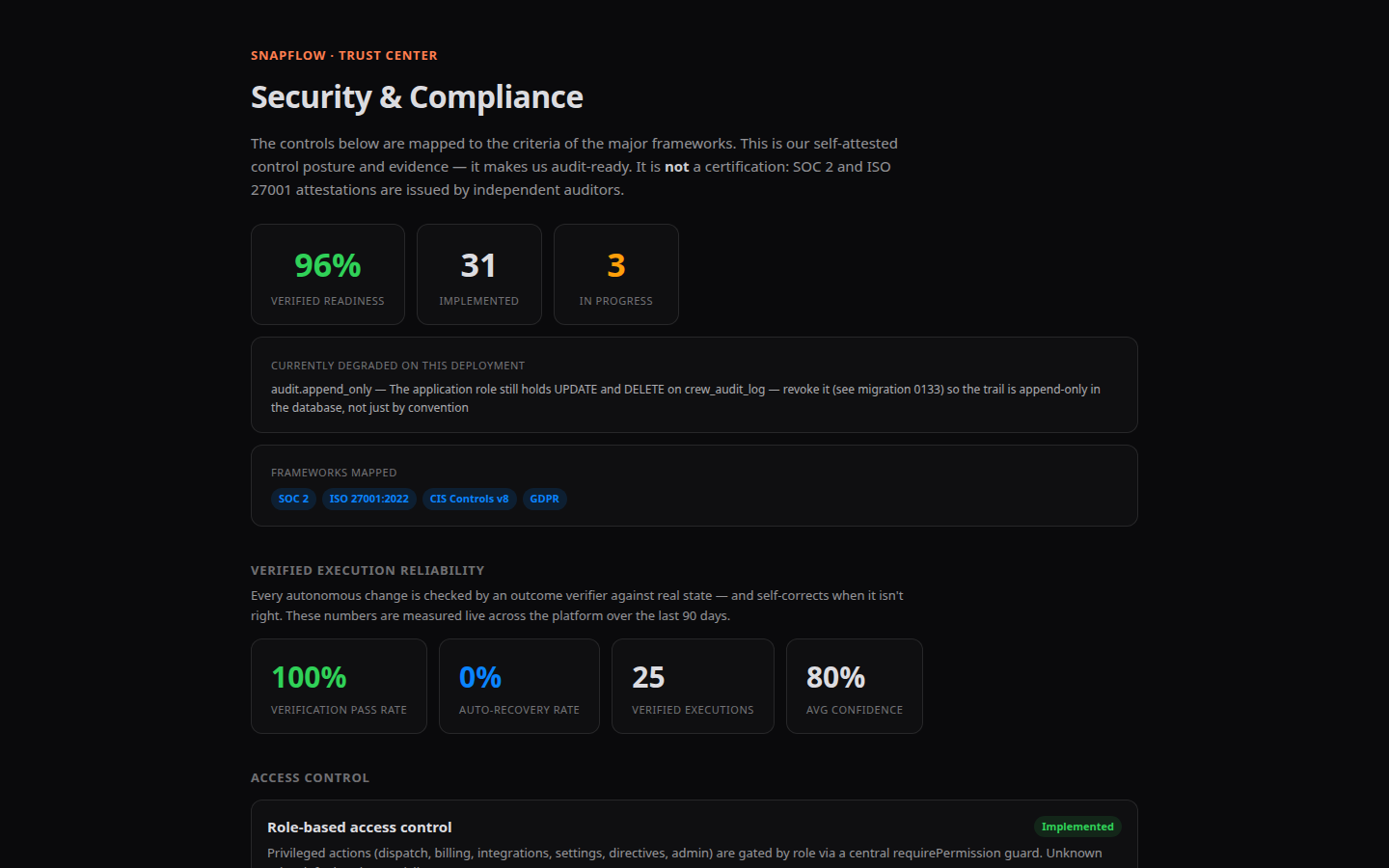
"The controls below are mapped to the criteria of the major frameworks. This is our self-attested control posture and evidence — it makes us audit-ready. It is not a certification: SOC 2 and ISO 27001 attestations are issued by independent auditors."
Posture at a glance
Stat tiles up top: a percentage score ("Verified readiness" when live data loads, or "Control readiness" if only fallback data is shown), an Implemented count, and an In progress count. If anything is currently degraded on the live deployment, an extra tile lists exactly which control and why. A "Frameworks mapped" tile lists which standards the controls are checked against (for example SOC 2, ISO 27001, CIS Controls v8, GDPR).
Verified execution reliability
"Every autonomous change is checked by an outcome verifier against real state — and self-corrects when it isn't right. These numbers are measured live across the platform over the last N days." Four stat tiles once there's enough data: Verification pass rate, Auto-recovery rate, Verified executions, Avg confidence.
The control list
Every individual control, grouped by domain (Access Control, Cryptography, Network Security, Audit & Monitoring, Change Management, Vulnerability Management, Data Lifecycle, Resilience). Each shows a title, a status chip (Implemented In progress Planned), a plain-English description, and small tags citing the exact framework clauses it satisfies.
Footer links: a security disclosure (security.txt), machine-readable Controls and Status APIs, and an email address for reporting a vulnerability.
Compliance (founder-only, private)
Anyone else who reaches this URL sees only: "Founder access only — The live compliance posture and audit trail are only visible to the agency's founder/owner account."
"Live control posture checked against the running deployment, the mechanisms behind it (chain verification, access review, retention, evidence export), and the raw audit trail. The public version of the control registry is at /trust." In other words: the Trust Center shows the same control catalog to the world; this page is where a founder can actually verify, live, that it's true right now — and pull the evidence to prove it to an auditor.
Control matrix
The same control list as the Trust Center, but checked live against your actual running deployment. If a control's real-time status is worse than what's declared publicly, its row is highlighted red with a "downgraded from <status>" tag — this is the mechanism that keeps the public Trust Center honest rather than aspirational.
Verification tools
| Tool | What it does |
|---|---|
| Deployment readiness | Lists any checks currently failing on this specific running deployment, with a remediation instruction for each. All-clear shows: "✓ Every live check passes on this deployment." |
| Audit trail integrity | Click "Verify now" to recompute every link in the hash chain. Shows verdict (Intact / BROKEN), events checked, and — if broken — the exact failure reason, sequence number, and row. |
| Access review | Who holds access, how recently they used it, and a dated acknowledgement you can point an auditor to. Click "Acknowledge review" to record a fresh sign-off; stat tiles flag dormant or flagged accounts. |
| Retention & legal hold | A configurable retention period (in days) and a "Legal hold — suspend all deletion" checkbox that halts pruning entirely when checked. |
| Evidence pack | Pick a From/To date range and click "Download pack" for one file containing control posture, the audit trail for that period, chain verification, approvals, and an access snapshot — plus a manifest and an offline verifier script ("Unpack, then run node verify.mjs"). |
Audit trail
The same underlying event log as Settings → Audit Trail (see Settings & Billing → Audit Trail), shown here alongside the verification tools — most recent 100 events, filterable by typing an action name.